
GTA 6 Filter
Put the GTA 6 filter on a photo you already have. You keep your pose, your friends and the place you were, and all of it comes back painted as GTA 6 art in about a minute.
Your first picture is a preview with a watermark.
Three steps
How to use the GTA 6 filter
No app, no camera effect to find and no prompt to write.
- 01
Add a photo
A selfie, a photo with friends, a holiday picture: any photo where the faces are clear, from your camera roll on a phone or a computer.
- 02
Pick the look
Painted, like the loading screen art, or In-game, like the game’s own 3D graphics. In the box beside your photo you can ask for small changes, like sunglasses or a pink sky.
- 03
Download your GTA 6 picture
It is ready in about a minute. Your first one is a preview with a watermark; pick a pack and the same picture comes out clean.
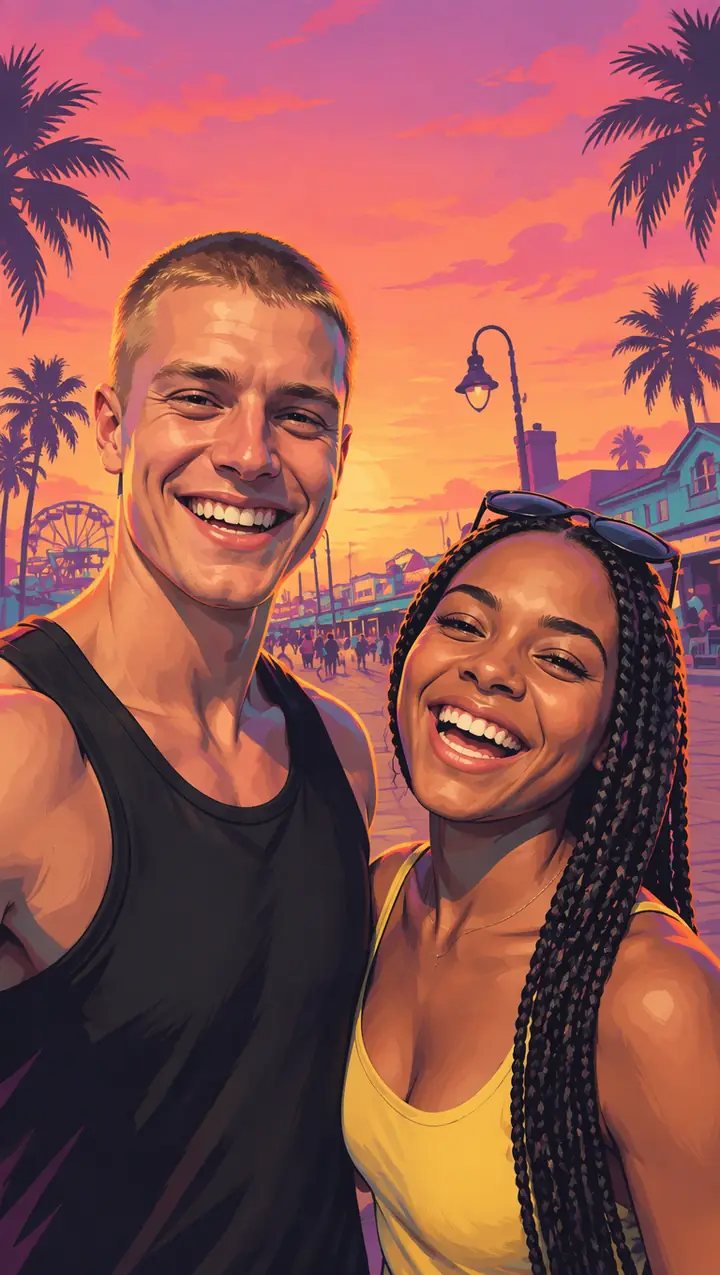
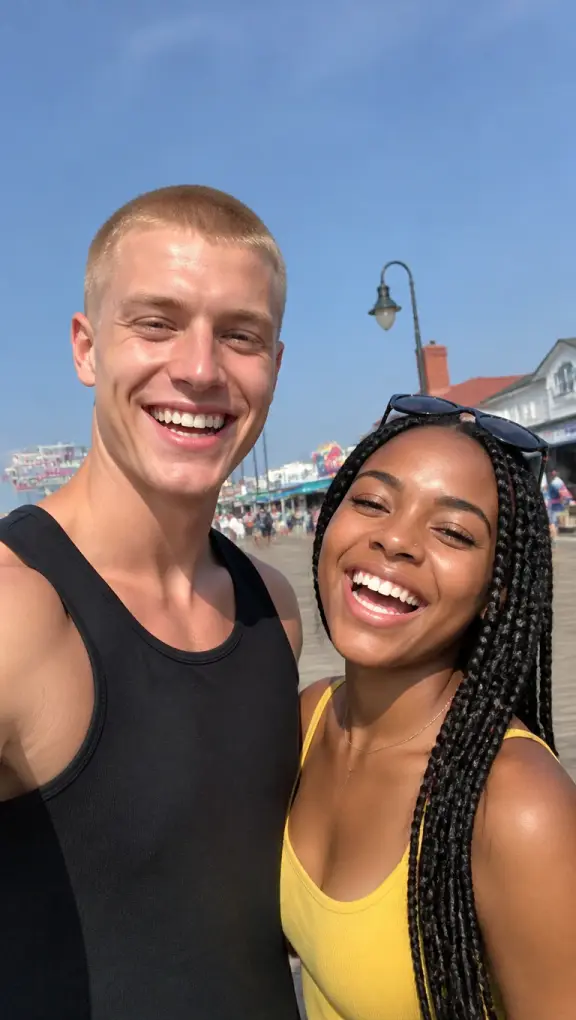 ↔PhotoGTA 6 filter
GTA AI filter
What the GTA 6 filter does to your photo
A camera filter lays colours over a photo. This GTA AI filter paints the photo again: every face, every piece of clothing, the street or the beach behind you, all of it in the style of GTA 6 art. What stays is what made it your photo: who is in it, how you stand and where you were.
The style is the one of the GTA 6 loading screens and posters: clean ink outlines, smooth shading with hard-edged shadows, orange light on you, violet shadows, and coral, magenta and turquoise colour.
It keeps your photo
The people in it, their poses and faces, their clothes, and the place it was taken.
It repaints all of it
Skin, hair, clothes and background come back as GTA 6 art, not as a photo with an effect over it.
It warms the light
Orange sunlight on you and violet shadows; outdoors, the sky turns into a Vice City sunset.
It keeps the shape
The picture comes out the shape of your photo, or vertical, square or wide if you pick it: a story, a post or a wallpaper.
GTA filter
GTA filter or GTA 6 filter: the same wish
People search for a GTA filter and for a GTA 6 filter, and they want the same thing: their own photo in the look of the game. The older posts copied the comic-book loading screens of GTA V; the GTA 6 filter follows the new game’s art, with pastel sunsets, palm trees and Vice City neon.
This GTA filter is made for the new look. It puts no game logo, title or character on your picture, so nothing on it is Rockstar’s. Add your own caption when you post it.
GTA 6 loading screen
From the GTA 6 filter to a GTA 6 loading screen
The filter keeps the background of your photo. For the picture from the TikTok trend instead, you as the painted art of a GTA 6 loading screen over a Vice City sunset, open the GTA 6 loading screen generator.
Cover art, Game character, Couple and With a car work the same way: one photo of you, and a new GTA scene drawn around you.
Video
Turn a photo or a video into GTA 6
The GTA 6 AI video generator on the home page does for a clip what the filter does for a photo: upload a short video of your own and it comes back in GTA 6 style, with the same people, the same moves and the same cuts, and with sound.
It can also turn one photo into a GTA 6 loading screen that comes to life, a sunset drive or a police chase.
More
More GTA 6 AI tools
- GTA 6 AI Video GeneratorYour own clip redrawn as GTA 6, or a photo that moves.
- GTA AI Image GeneratorAll six picture templates, and Your idea.
- GTA 6 Loading Screen GeneratorYou as the painted loading screen art.
- Turn Yourself Into a GTA CharacterYou as a game character in Vice City.
- GTA 6 AI PromptsThe prompts people use in ChatGPT and Gemini.
Questions
GTA 6 filter FAQ
Is this the official GTA 6 filter?
No. It is a fan-made GTA 6 filter, not made by or linked to Rockstar Games or Take-Two Interactive. It paints your photo in the style of the game’s art and adds none of its logos or characters.
How is the filter different from the other templates?
The filter keeps your photo: the same pose, the same people, the same place, repainted as GTA 6 art. The other templates draw a new scene around you, like a loading screen over a Vice City sunset or you leaning on a muscle car.
Does the picture keep the shape of my photo?
Yes, unless you pick another: the shape button starts on As my photo. You can also ask for a vertical, square or wide picture, and the photo is reframed to fit.
Is there a GTA 6 filter for videos?
Yes, on the home page. Upload a short clip and the GTA 6 AI video generator redraws it in GTA 6 style with the same people, moves and cuts.
Can I try the GTA 6 filter before paying?
Yes. Your first picture is a preview with a watermark, one per person across the GTA picture tools. Pick a pack to download it clean and to put the filter on more photos.
Which photos work best with the GTA 6 filter?
Photos with a place in them: a street, a beach, a car, a night out. The filter keeps the background, so a good spot makes a better GTA picture than a plain wall. Keep the faces sharp and turned to the camera.
Can I turn a photo into a GTA 6 loading screen?
Yes, on the GTA 6 loading screen generator: you get the painted portrait from the TikTok trend, waist up over a Vice City sunset.
What happens to my photo?
It is used only to make your pictures and videos. It stays with what you made in My photos & videos and is deleted when you delete it; a photo you add and never use is erased within a day.
GTA 6 AI Video is an independent, unofficial fan tool. It is not affiliated with, endorsed by or sponsored by Rockstar Games, Take-Two Interactive or TikTok. Grand Theft Auto, GTA and GTA VI are trademarks of Take-Two Interactive; they are used here only to describe the look people ask for. No game footage, artwork or logos are used. Every video and picture made here is AI-generated: say so when you share it. Rights holders can write to support@gta6aivideo.app.